
Manage Multiple Cover Letters
CreatiCV allows you to create and manage multiple cover letters.
This helps you customize your applications for different jobs and companies.
View Your Cover Letters
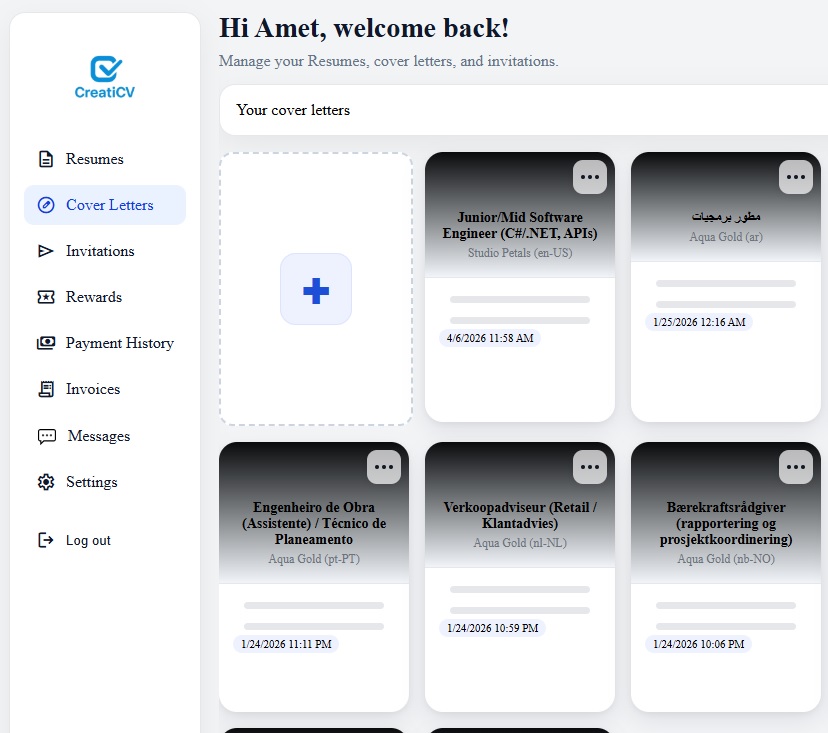
Go to your Dashboard and click Cover Letters to see all your cover letters.
Each cover letter is displayed as a card.
Create a New Cover Letter
Click the “+” card to create a new cover letter.
You can create different cover letters for different job applications.
Use Different Cover Letters for Different Jobs
It is recommended to create separate cover letters for:
-
Different companies
-
Different job positions
-
Different industries
This helps you tailor your message and improve your chances.
Edit or Delete a Cover Letter
Click the three-dot menu (⋯) on a cover letter card to:
-
Edit
-
Delete
Stay Organized
To manage your cover letters effectively:
-
Use clear and meaningful titles
-
Keep your content updated
-
Remove unused cover letters
What’s Next?
After managing your cover letters, you can:
-
Improve your resume
-
Use AI tools for suggestions
-
Apply to jobs with confidence